
For most of this year my setup was one agent in one terminal. I gave Claude Code a task, watched it, answered its questions, reviewed the result, and started the next one. The Ralph Wiggum loop I wrote about in January automated the “start the next one” part, but it was still a single agent working through a single list, and nobody reviewed what it produced until I did.
What I wanted instead was closer to how a small team works. Someone plans the work and splits it into pieces that don’t step on each other. Someone implements each piece, someone else reviews it, and the tests decide whether it is done. I approve the plan and look at the results. I don’t want to watch every step in between.
This post describes how I set that up with Herdr and a handful of agent templates: what each part does, how a task moves through it, and how I use the window day to day.
Two pieces: the window and the core
Herdr is a native app for running coding agents. It comes in two parts, and the split matters for everything that follows.
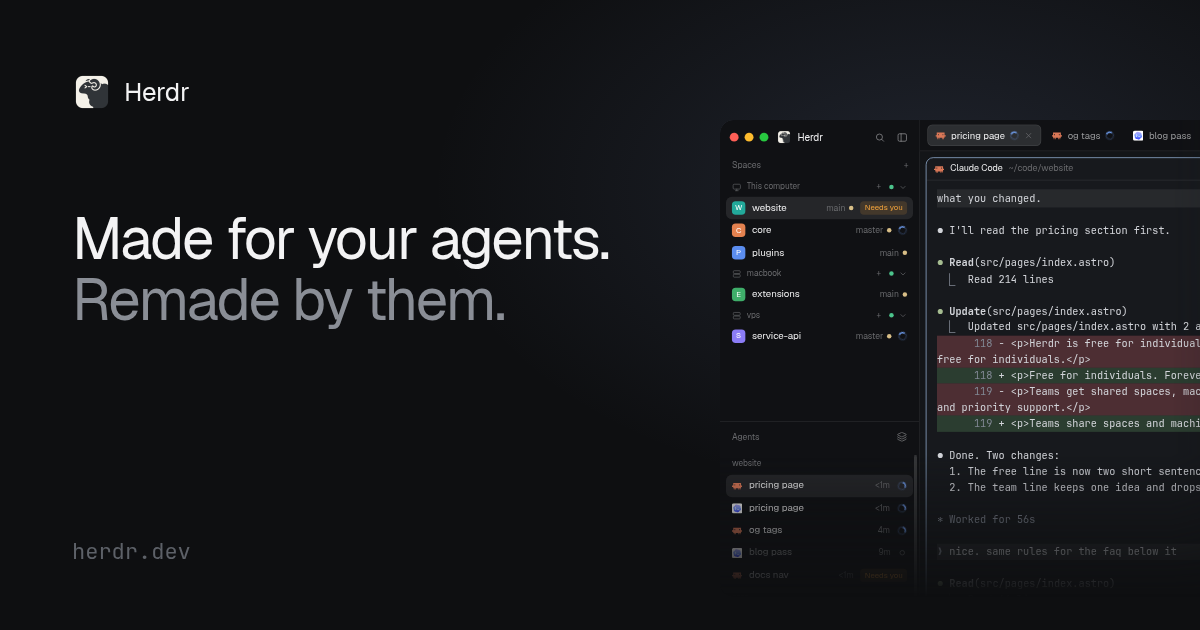
- herdr-core, with its CLI
hc, runs programs in persistent terminals. Every terminal has an address liket7, can be started, read, sent messages, and waited on, and keeps running when no window shows it. An agent can start other agents withhc run; those become its children, and they report back to it withhc send. - herdr-app is the window. It shows spaces, tabs and panes on top of the core’s terminals. When I close it, nothing stops. When I open it again, everything is where it was.
Templates sit between the two. A template is a Markdown file in
~/.config/herdr-core/templates/. Its frontmatter has a name, a description,
and the command that starts the agent, including the model and effort. Its
body is the instructions the agent gets with its first task. hc run reviewer "review src/x.rs" starts a reviewer with those instructions plus my task.
flowchart TB
    me([Me])
    subgraph app [herdr-app window]
        space[Space per repository]
        tab[Tab with a shell]
        sidebar[Agents sidebar]
    end
    subgraph core [herdr-core]
        planner[planner]
        sdlc1[sdlc item 1]
        sdlc2[sdlc item 2]
        workers[implementer, simplifier, reviewer, adversaries]
    end
    templates[(Templates in ~/.config/herdr-core/templates)]
    me --> space
    space --> tab
    tab -->|hc run| planner
    planner -->|hc run| sdlc1
    planner -->|hc run| sdlc2
    sdlc1 -->|hc run| workers
    sdlc2 -->|hc run| workers
    templates -.->|command and instructions| core
    core -.->|status and sub-agents| sidebar
The templates
I have eight templates. Four of them do the actual work on code, two attack plans and changes, and two orchestrate the others.
| Template | Model | Role |
|---|---|---|
implementer |
Opus 5.5, medium effort | Implements a scoped change and proves it with tests |
implementer-local |
Qwen3.6-35B-A3B via pi | Small, mechanical changes on a local model in LM Studio |
simplifier |
Opus 5.5, medium effort | Removes over-engineering without changing behavior |
reviewer |
Opus 5.5, high effort | Read-only review for bugs, security issues and risk |
adversary-fable |
Fable 5.1, high effort | Assumes the change is broken and tries to prove it |
adversary-codex |
gpt-6.1-sol via Codex, high | The same job on a different model family |
sdlc |
Opus 5.5, high effort | Runs one task through implement, review and test |
planner |
Opus 5.5, high effort | Turns a backlog or a spec into a plan and dispatches it |
A template is short. This is the frontmatter of the simplifier, wrapped for reading and without the part of the command that picks my work profile for client repositories:
---name: simplifierdescription: Simplifies code in the scope it is given without changing behavior; removes over-engineering, then proves behavior is unchanged with build and tests.command: claude --model claude-opus-5-5 --effort medium --disallowed-tools Agent---One detail in that command is deliberate. --disallowed-tools Agent stops
the agent from starting Claude Code subagents of its own. If a role needs help,
it starts another hc terminal, which I can see and talk to. Reviewers and
adversaries also lose Edit and Write, so they cannot “fix” what they are
supposed to report.
The orchestrators and the Fable adversary also set
CLAUDE_CODE_DISABLE_ADVISOR_TOOL=1, which turns off Claude Code’s advisor.
The advisor sends the whole conversation to a stronger model for a second
opinion. That helps an implementer or a reviewer that has to reason about code.
It does not help an agent whose job is to start other agents and wait, and the
adversary already runs on the strongest model I have. The implementer, the
simplifier and the reviewer keep it.
hc starts every child with the core’s environment, not the environment of the agent that started it. I checked this because I wanted to know whether an environment variable set in one template leaks into its children. It doesn’t. Each template sets what it needs in its own command.
sdlc: one task from brief to pull request or commit
sdlc takes one task and never edits code itself. It starts the other roles,
passes their results along, and decides what happens next.
flowchart TD
    start([Task or brief]) --> choose{Small and mechanical?}
    choose -->|yes| local[implementer-local]
    choose -->|no| impl[implementer]
    local -->|blocked or high finding| impl
    local --> simplify
    impl --> simplify{Diff over 50 lines?}
    simplify -->|yes| simp[simplifier]
    simplify -->|no| review
    simp --> review[reviewer]
    review --> risk{High risk?}
    risk -->|yes| adv[adversary-fable as well]
    risk -->|no| fixes
    adv --> fixes[implementer fixes findings]
    fixes --> check[same reviewer checks the fixes]
    check --> gate[sdlc runs the test gate]
    gate -->|green| land([Draft PR or commit on main])
    gate -->|red after one fix round| blocked([Blocked, with a report])
A few rules shape this flow.
Which implementer. The local model gets a task only when every one of these holds: at most three files, no shared resources beyond one configuration value, mechanical work such as tests for existing behavior or a rename, no authentication, authorization, tenant isolation or deletion code, an existing build or test command proves it, and the change stays under about 150 lines. Anything else goes to Opus. If the local model reports that it is stuck, or the review finds a serious problem in its work, sdlc switches to Opus once and hands over what is already in the working tree.
One review, not two. I used to run two full review rounds. The second round mostly re-read code that had not changed. Now the same reviewer stays alive after its review, and once the implementer has fixed the findings, it compares the diff it reviewed with the fixed diff. That is cheaper, and the reviewer knows exactly what it asked for.
Risk adds an adversary. If the brief says the task is high risk, or the
diff touches authentication, authorization, tenant isolation, migrations,
deletion, payment or secrets, adversary-fable reviews alongside the regular
reviewer. Its job is to construct a concrete failure scenario, not to comment
on style.
The test gate is sdlc’s own. After the fixes, sdlc runs the repository’s
gate itself, for example just ci. It does not take an implementer’s word that
the tests pass. One fix round is allowed. If the gate is still red, the task
stops with a report instead of a pull request.
planner: from a backlog to many sdlc runs
The planner sits on top. I give it a source of work, and it produces a plan I can approve. After that it runs the plan without me.
flowchart TD
    collect[Collect items or read the spec] --> plan[Write briefs and shape the list]
    plan --> adv[adversary-fable and adversary-codex attack the plan]
    adv --> revise[Revise confirmed findings]
    revise --> approve{I approve}
    approve -->|changes| plan
    approve -->|go| dispatch[One worktree and one sdlc per item]
    dispatch --> report[run.md with results]
Collect. It reads the repository’s CLAUDE.md and AGENTS.md, the items,
and the code they would change. It also looks for existing branches and pull
requests for each item, so that work I started by hand continues where it is.
Plan. Each item gets a brief: problem, testable acceptance criteria, what is in and out of scope, the files and shared resources it will touch, its one dependency, how to verify it, which implementer, and the risk. Then the list is shaped so that two items running at the same time never touch the same files. Items that would overlap get ordered instead.
Adversarial review. Two adversaries on two different model families attack the plan: items that claim to be independent but aren’t, missing files in a touch set, acceptance criteria nobody can test, items marked local that shouldn’t be. The planner checks each finding against the code and revises.
Approval. This is the one step that needs me. Only a message I type into the planner’s session counts. A message from another agent never does, whatever it says.
Dispatch. Each item gets its own git worktree beside the repository, at
<repo>.worktrees/<key>, and its own sdlc agent. At most two sdlc agents work
at the same time, and at most one of them uses the local model. When an item
finishes, the next one whose dependency is done starts. If an item blocks,
everything that depends on it is marked as not started, and the rest carries
on. At the end, run.md lists what landed, what blocked and why, and what is
left for me to decide.
Three settings
The first version of the planner assumed Azure Boards and pull requests, because that is what my client project uses. My own work looks different. Most of it is tracked in GitHub issues. Some of it starts as a long specification that I don’t want to turn into fifty issues. And some of my repositories don’t use pull requests at all; I push to main.
So the planner now reads three settings from the task:
| Setting | Values | Default |
|---|---|---|
source |
github, azure, spec |
Whatever the task points at |
tracking |
tracker, local |
tracker for GitHub or Azure, local for spec |
integration |
pr, direct |
pr |
There is no special syntax. I write the task in plain words, and the planner
records the settings it settled on in plan.md and in the approval summary, so
I can check them before I approve.
Plan the open issues labelled "v3" in dariuszparys/foo.Plan issues #41, #42 and #57 in dariuszparys/foo. Tracking: local.Plan from docs/spec/billing.md. Integration: direct, push to main, no PRs.direct is never inferred. Even in a repository without a single pull request
in its history, the planner uses pull requests unless the task says otherwise.
From a long specification to packages
When I write a specification, it is usually long: architecture, data model, interfaces, behavior, constraints. The planner treats it as the source and cuts it into packages itself.
It starts by listing every requirement in coverage.md with an id, the
section heading and the line range, and it records which version of the spec it
read. Then it reads the existing code and marks requirements that are already
met. Every remaining requirement has to end up somewhere: in a package, as
already existing, as out of scope, or as deferred with a reason. None may stay
unmapped, and the adversaries check that too.
| Req | Section | Lines | Mapped to || --- | -------------------- | ------- | ---------- || R1 | Project layout | 12-40 | billing-01 || R2 | Invoice model | 41-88 | billing-02 || R3 | Tax rules per region | 89-160 | billing-03 || R4 | PDF export | 161-190 | deferred |Packages are vertical slices. A package delivers one feature end to end and leaves the main branch building with its tests green, rather than building one layer across all features. If the repository doesn’t have a build, tests and a quality gate yet, the first package is a skeleton that sets them up, and the packages after it depend on it. Anything the spec leaves open that would change what gets built becomes a question for me before approval.
With tracking: local, the plan directory is the only record. Nothing is
written to GitHub or Azure Boards, commit messages name the package key and
the spec sections instead of an issue number, and keys look like billing-01.
Straight to main
Direct integration was the part I thought about longest. With pull requests, two items finishing at the same time is not a problem; each gets its own pull request. With direct pushes, two agents racing to push to main is exactly the kind of problem I don’t want to debug at night.
So landing is a queue, and the planner controls it.
sequenceDiagram
    participant P as planner
    participant S as sdlc
    participant O as origin main
    S->>S: squash to one commit
    S->>P: ready, branch and report
    Note over P: queue, one item at a time
    P->>S: integrate
    S->>O: fetch
    S->>S: rebase onto origin main
    S->>S: run the test gate again
    S->>O: push HEAD to main
    S->>P: done, commit
    P->>O: verify the commit is on main
    Note over P: send integrate to the next item
When an sdlc agent finishes, it squashes its branch into one commit, reports
ready, and waits. The planner sends integrate to one agent at a time. That
agent fetches, rebases onto main, and runs the test gate again, because main
may have changed since it last ran. If the rebase hits conflicts, the
implementer gets one round to resolve them. If the push is rejected because
another commit landed in between, it repeats the rebase, gate and push once.
After that it blocks instead of trying forever. The planner checks that the
reported commit really is on main before it lets the next item go.
A red gate does not land. The only exception is a failure that already exists on main: the agent checks out main in a temporary worktree and runs the same command there. If it fails the same way, the failure isn’t the change’s fault.
In direct mode nobody reviews the code before it lands except the agents. The approval summary says so in plain words, so I see it right before I approve. For a personal project that is a trade I’m willing to make. For client work I stay with pull requests.
How I use it in the window
A typical session looks like this.
-
I open a space for the repository in Herdr. Its first tab is a shell in the repository folder.
-
In that shell I start the planner in the background, with the task:
Terminal window hc run --bg --name planner planner "Plan from docs/spec/billing.md." -
I talk to it with
hc attach planner. That is where I answer its questions and, eventually, approve the plan.Ctrl+\detaches me again without stopping it. -
After approval, the sdlc agents and their children appear in the agents sidebar, grouped under the tab that started them. Each shows a status: working, blocked, idle, or done. A tab and a space show the most urgent status of their agents, so a blocked agent anywhere is visible from the space list.
-
When I want to see what an agent is doing, I peek at it from the sidebar, or Cmd-click its address when another agent mentions it. If I want to keep one on screen, I give it its own pane.
-
When I’m done for the day, I close the window. The agents keep working in the core. The next morning,
run.mdand the reports tell me what happened.
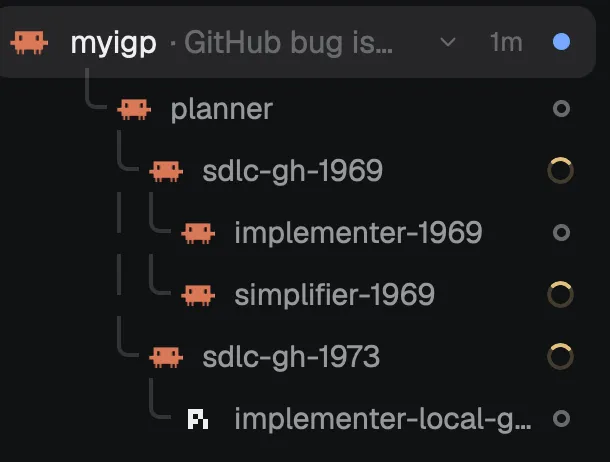
The workers I don’t need to see stay out of the way. They run as children of their sdlc agent, and they only take up space on screen if I give them a pane.
What I haven’t tested yet
The planner and sdlc flow with GitHub issues, Azure Boards and pull requests is what I use every day. Specs as a source, local tracking and direct integration are new. I have read through them carefully and had an independent agent review both templates. That review found eleven problems, including a deadlock in the push retry and a branch lookup that would have matched issue #412’s branch for issue #41. All are fixed, but none of these modes has run on a real plan yet. The first real run will be a throwaway repository with a short spec, not something I care about.